[root@localhost ~]# yum install httpd* -y
[root@localhost ~]# yum install gcc* -y
[root@localhost ~]# yum install gd* -y
[root@localhost ~]# yum install glibc* -y
[root@localhost ~]# /usr/sbin/useradd nagios
[root@localhost ~]# passwd nagios
Changing password for user nagios.
New UNIX password:
BAD PASSWORD: it is WAY too short
Retype new UNIX password:
passwd: all authentication tokens updated successfully.
[root@localhost ~]# /usr/sbin/groupadd nagcmd
[root@localhost ~]# /usr/sbin/usermod -G nagcmd nagios
[root@localhost ~]# /usr/sbin/usermod -G nagcmd apache
[root@localhost ~]# mkdir ~/downloads
[root@ns1 nagios server docs]# cp nagios-3.0.3.tar.gz ~/downloads/
[root@ns1 nagios server docs]# cp nagios-plugins-1.4.11.tar.gz
~/downloads/
[root@ns1 nagios server docs]# cd ~/downloads/
[root@ns1 downloads]# ls
nagios-3.0.3.tar.gz nagios-plugins-1.4.11.tar.gz
[root@ns1 downloads]# tar -zxvf nagios-3.0.3.tar.gz
[root@ns1 downloads]# ls
nagios-3.0.3 nagios-3.0.3.tar.gz nagios-plugins-1.4.11.tar.gz
[root@ns1 downloads]# cd nagios-3.0.3
[root@ns1 nagios-3.0.3]# ls
base configure.in install-sh nagios.spec THANKS
cgi contrib LEGAL OutputTrap.pm update-version
Changelog daemon-init.in LICENSE p1.pl UPGRADING
common functions Makefile.in pkginfo.in xdata
config.guess html make-tarball README
config.sub include mkpackage sample-config
configure INSTALLING module subst.in
[root@ns1 nagios-3.0.3]#./configure --with-command-group=nagcmd
[root@ns1 nagios-3.0.3]# make all
[root@ns1 nagios-3.0.3]# make install
[root@ns1 nagios-3.0.3]# make install-init
[root@ns1 nagios-3.0.3]# make install-commandmode
[root@ns1 nagios-3.0.3]# make install-config
[root@ns1 nagios-3.0.3]# make install-webconf
[root@ns1 nagios-3.0.3]# cd /usr/local/nagios/sbin/
[root@ns1 sbin]# ls
avail.cgi histogram.cgi showlog.cgi statuswrl.cgi
cmd.cgi history.cgi status.cgi summary.cgi
config.cgi notifications.cgi statusmap.cgi tac.cgi
extinfo.cgi outages.cgi statuswml.cgi trends.cgi
[root@ns1 sbin]# vim .htaccess
AuthName "Nagios Access"
AuthType Basic
AuthUserFile /usr/local/nagios/etc/htpasswd.users
require valid-user
[root@ns1 sbin]# chown apache .htaccess
[root@ns1 sbin]# chmod 644 .htaccess
[root@ns1 sbin]# cd ..
[root@ns1 nagios]# ls
bin etc libexec sbin share var
[root@ns1 nagios]# cd share/
[root@ns1 nagios]# vim .htaccess
AuthName "Nagios Access"
AuthType Basic
AuthUserFile /usr/local/nagios/etc/htpasswd.users
require valid-user
[root@ns1 nagios]# chown apache .htaccess
[root@ns1 nagios]# chmod 644 .htaccess
[root@ns1 nagios]# htpasswd -bc /usr/local/nagios/etc/htpasswd.users
nagiosadmin 123456
Adding password for user nagiosadmin
[root@ns1 nagios-plugins-1.4.11]# cd /usr/local/nagios/etc/
[root@ns1 etc]# vim htpasswd.users
nagiosadmin:F7776tsdeZhh6
[root@ns1 nagios]# chown apache /usr/local/nagios/etc/htpasswd.users
[root@ns1 nagios]# chmod 644 /usr/local/nagios/etc/htpasswd.users
[root@ns1 nagios]# chkconfig httpd on
[root@ns1 nagios]# /etc/init.d/httpd restart
Stopping httpd: [ OK ]
Starting httpd: [ OK ]
[root@ns1 downloads]# cd ~/downloads/
[root@ns1 downloads]# ls
nagios-3.0.3 nagios-3.0.3.tar.gz nagios-plugins-1.4.11.tar.gz
[root@ns1 downloads]# tar -zxvf nagios-plugins-1.4.11.tar.gz
[root@ns1 downloads]# ls
nagios-3.0.3 nagios-plugins-1.4.11
nagios-3.0.3.tar.gz nagios-plugins-1.4.11.tar.gz
[root@ns1 downloads]# cd nagios-plugins-1.4.11
[root@ns1 nagios-plugins-1.4.11]# ls
ABOUT-NLS config.rpath m4 plugins-scripts
acinclude.m4 config_test Makefile.am po
ACKNOWLEDGEMENTS configure Makefile.in README
aclocal.m4 configure.in mkinstalldirs REQUIREMENTS
AUTHORS contrib nagios-plugins.spec SUPPORT
BUGS COPYING NEWS test.pl.in
build-aux FAQ NPTest.pm THANKS
ChangeLog gl perlmods tools
CODING INSTALL pkg
command.cfg.in LEGAL plugins
config.h.in lib plugins-root
[root@ns1 nagios-plugins-1.4.11]# ./configure --with-nagios-user=nagios
--with-nagios-group=nagios
[root@ns1 nagios-plugins-1.4.11]# make all
[root@ns1 nagios-plugins-1.4.11]# make install
[root@ns1 nagios-plugins-1.4.11]# chkconfig --add nagios
[root@ns1 nagios-plugins-1.4.11]# chkconfig nagios on
[root@ns1 nagios-plugins-1.4.11]# /usr/local/nagios/bin/nagios -v
/usr/local/nagios/etc/nagios.cfg
[root@ns1 nagios-plugins-1.4.11]# service nagios start
Starting nagios: done.
[root@ns1 etc]# vim /usr/local/nagios/etc/nagios.cfg
cfg_file=/usr/local/nagios/etc/objects/switch.cfg
[root@ns1 etc]# cd /usr/local/nagios/etc/objects/
[root@ns1 objects]# ls
commands.cfg localhost.cfg switch.cfg timeperiods.cfg
contacts.cfg printer.cfg templates.cfg windows.cfg
[root@ns1 objects]# vim switch.cfg
define service{
use generic-service ; Inherit values from a
template
host_name DHK15 ; The name of the host the service is
associated with
service_description PING ; The service description
check_command check_ping!200.0,20%!600.0,60% ; The command used to monitor the service
normal_check_interval 5 ; Check the service every 5
minutes under normal conditions
62,0-1
51%
retry_check_interval 1 ; Re-check the service every minute
until its final/hard state is determined
}
# Monitor uptime via SNMP
define service{
use generic-service ; Inherit values from a
template
host_name DHK15
service_description Uptime
check_command check_snmp!-C public -o sysUpTime.0
}
# Monitor Port 1 status via SNMP
define service{
use generic-service ; Inherit values from a
template
host_name DHK15
service_description Port 1 Link Status
check_command check_snmp!-C public -o ifOperStatus.1 -r 1
-m RFC1213-MIB
}
# Monitor bandwidth via MRTG logs
define service{
use generic-service ; Inherit values from a
template
host_name DHK15
service_description Port 1 Bandwidth Usage
check_command
check_local_mrtgtraf!/var/lib/mrtg/192.168.1.253_1.log!AVG!1000000,1000000!5000000,5000000!10
}
[root@ns1 objects]# /etc/rc.d/init.d/nagios reload
Running configuration check...done.
Reloading nagios configuration...done
For Creat another device :
[root@ns1 objects]# vim /usr/local/nagios/etc/nagios.cfg
cfg_file=/usr/local/nagios/etc/objects/router.cfg
[root@ns1 objects]# cp switch.cfg router.cfg
[root@ns1 objects]# ls
commands.cfg localhost.cfg router.cfg templates.cfg windows.cfg
contacts.cfg printer.cfg switch.cfg timeperiods.cfg
[root@ns1 objects]# vim router.cfg
# Create a service to PING to switch
define service{
use generic-service ; Inherit values from a
template
host_name DHK14 ; The name of the host the service is
associated with
service_description PING ; The service description
check_command check_ping!200.0,20%!600.0,60% ; The command
used to monitor the service
normal_check_interval 5 ; Check the service every 5
minutes under normal conditions
retry_check_interval 1 ; Re-check the service every
minute until its final/hard state is determined
}
# Create a new hostgroup for switches
define hostgroup{
hostgroup_name router ; The name of the hostgroup
alias Network Switches ; Long name of the group
}
define service{
use generic-service ; Inherit values from a
template
host_name DHK14 ; The name of the host the service is
associated with
service_description PING ; The service description
check_command check_ping!200.0,20%!600.0,60% ; The command
used to monitor the service
normal_check_interval 5 ; Check the service every 5
minutes under normal conditions
retry_check_interval 1 ; Re-check the service every
minute until its final/hard state is determined
}
# Monitor uptime via SNMP
define service{
use generic-service ; Inherit values from a
template
host_name DHK14
service_description Uptime
check_command check_snmp!-C public -o sysUpTime.0
}
# Monitor Port 1 status via SNMP
define service{
use generic-service ; Inherit values from a
template
host_name DHK14
service_description Port 1 Link Status
check_command check_snmp!-C public -o ifOperStatus.1 -r 1
-m RFC1213-MIB
}
# Monitor bandwidth via MRTG logs
define service{
use generic-service ; Inherit values from a
template
host_name DHK14
service_description Port 1 Bandwidth Usage
check_command
check_local_mrtgtraf!/var/lib/mrtg/192.168.1.253_1.log!AVG!1000000,1000000!5000000,5000000!10
}
[root@ns1 objects]# /usr/local/nagios/bin/nagios -v
/usr/local/nagios/etc/nagios.cfg
[root@ns1 objects]# /etc/rc.d/init.d/nagios reload
Running configuration check...done.
Reloading nagios configuration...done
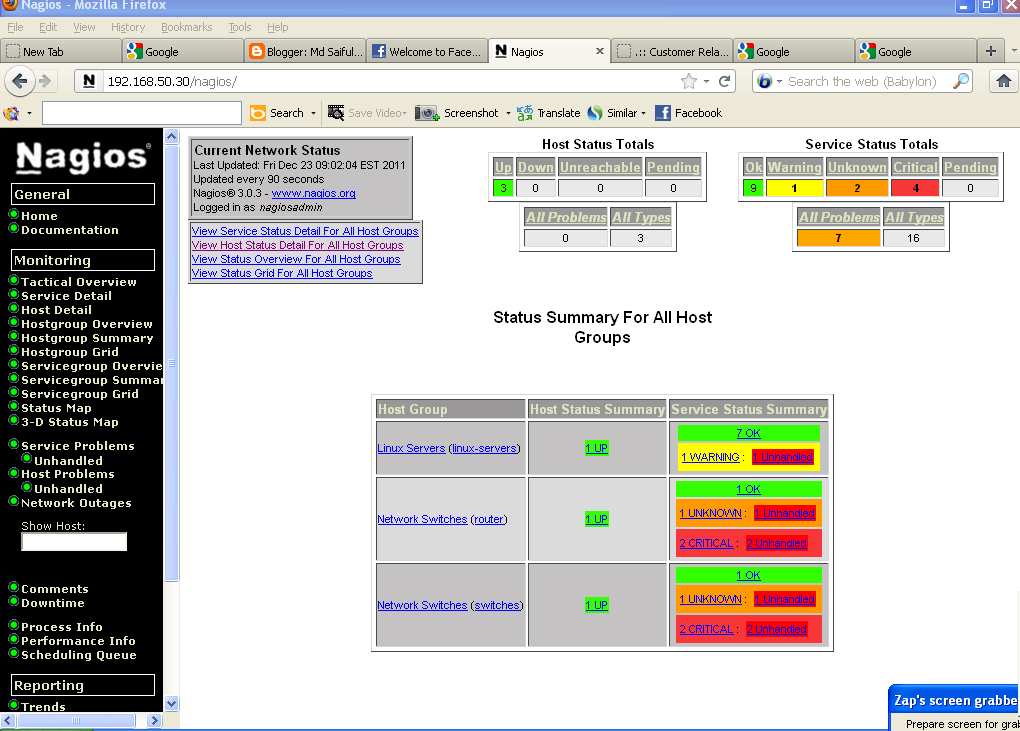
We should now be able to access the Nagios web interface at the URL below.
We'll be prompted for the username (nagiosadmin) and password we specified
earlier.
http://localhost/nagios/

[root@localhost ~]# cd /usr/local/nagios/
[root@localhost nagios]# ls
bin etc libexec sbin share var
[root@localhost nagios]# mv share share.bak
 [root@localhost nagios]# ll
total 28
drwxrwxr-x 2 nagios nagios 4096 Jan 3 18:40 bin
drwxrwxr-x 3 nagios nagios 4096 Jan 3 18:42 etc
drwxrwxr-x 2 nagios nagios 4096 Jan 3 18:47 libexec
drwxrwxr-x 2 nagios nagios 4096 Jan 3 18:41 sbin
drwxr-xr-x 3 root root 4096 Dec 19 18:45 share
drwxrwxr-x 9 nagios nagios 4096 Jan 3 18:47 share.bak
drwxrwxr-x 5 nagios nagios 4096 Jan 3 19:17 var
You have new mail in /var/spool/mail/root
[root@localhost nagios]# chown -R nagios.nagios share
[root@localhost nagios]# ll
total 28
drwxrwxr-x 2 nagios nagios 4096 Jan 3 18:40 bin
drwxrwxr-x 3 nagios nagios 4096 Jan 3 18:42 etc
drwxrwxr-x 2 nagios nagios 4096 Jan 3 18:47 libexec
drwxrwxr-x 2 nagios nagios 4096 Jan 3 18:41 sbin
drwxr-xr-x 3 nagios nagios 4096 Dec 19 18:45 share
drwxrwxr-x 9 nagios nagios 4096 Jan 3 18:47 share.bak
drwxrwxr-x 5 nagios nagios 4096 Jan 3 19:18 var
[root@localhost nagios]# chmod 775 share
[root@localhost nagios]# /etc/init.d/nagios reload
Running configuration check...done.
Reloading nagios configuration...done
[root@localhost nagios]# ls
bin etc libexec sbin share var
[root@localhost nagios]# mv share share.bak

total 28
drwxrwxr-x 2 nagios nagios 4096 Jan 3 18:40 bin
drwxrwxr-x 3 nagios nagios 4096 Jan 3 18:42 etc
drwxrwxr-x 2 nagios nagios 4096 Jan 3 18:47 libexec
drwxrwxr-x 2 nagios nagios 4096 Jan 3 18:41 sbin
drwxr-xr-x 3 root root 4096 Dec 19 18:45 share
drwxrwxr-x 9 nagios nagios 4096 Jan 3 18:47 share.bak
drwxrwxr-x 5 nagios nagios 4096 Jan 3 19:17 var
You have new mail in /var/spool/mail/root
[root@localhost nagios]# chown -R nagios.nagios share
[root@localhost nagios]# ll
total 28
drwxrwxr-x 2 nagios nagios 4096 Jan 3 18:40 bin
drwxrwxr-x 3 nagios nagios 4096 Jan 3 18:42 etc
drwxrwxr-x 2 nagios nagios 4096 Jan 3 18:47 libexec
drwxrwxr-x 2 nagios nagios 4096 Jan 3 18:41 sbin
drwxr-xr-x 3 nagios nagios 4096 Dec 19 18:45 share
drwxrwxr-x 9 nagios nagios 4096 Jan 3 18:47 share.bak
drwxrwxr-x 5 nagios nagios 4096 Jan 3 19:18 var
[root@localhost nagios]# chmod 775 share
[root@localhost nagios]# /etc/init.d/nagios reload
Running configuration check...done.
Reloading nagios configuration...done